
Introduction
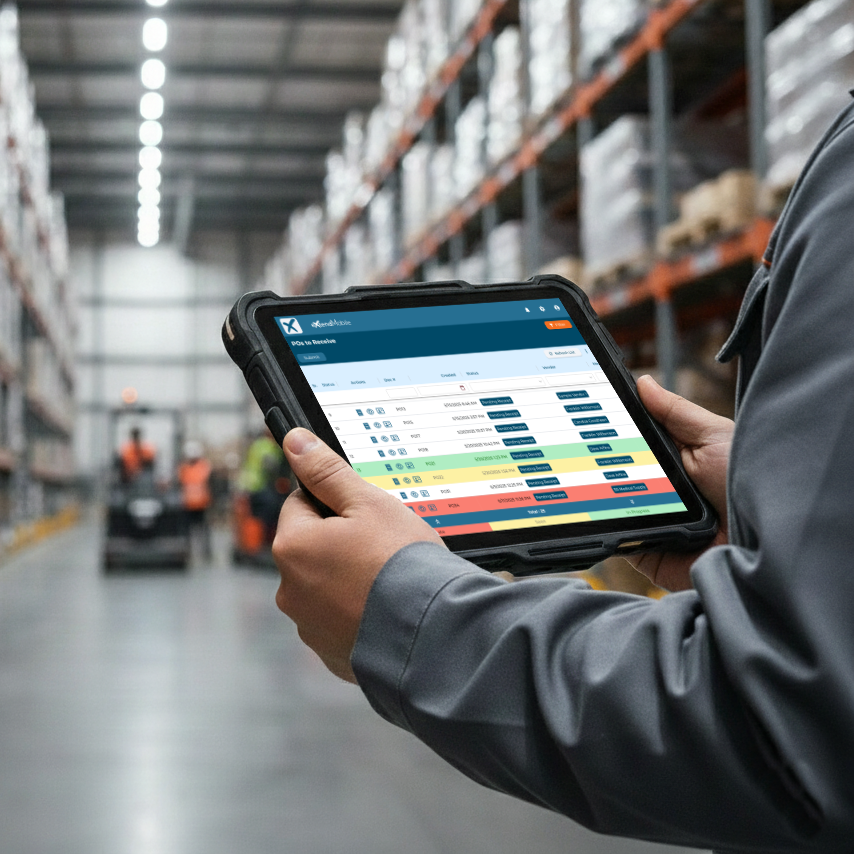
It’s 8:30 a.m., and three delivery trucks just backed up to your dock. Each driver is waiting for direction, each pallet is labeled with a different purchase order—and your receiving team is already juggling multiple inbound shipments.
One PO is three days overdue. Another is scheduled for today. The third has partial receipts pending. And you’re standing there, mobile in hand, wondering: Which one do we process first?
The Daily Challenge of Managing Inbound Chaos
For warehouse managers and receiving clerks, this moment isn’t rare—it’s routine. Every delivery brings a mix of priorities, and without a clear way to visualize which orders are urgent, time slips away fast.
Even with NetSuite, the workflow can feel cumbersome:
- Logging in at your desk to check expected receipt dates
- Opening multiple tabs to view different POs
- Calling vendors for updates—and remembering to log the conversation later
When you’re standing at the dock, that process doesn’t fit the pace of your workday.
The Shift: From Manual Management to Mobile-First Control
Now imagine opening your mobile device and instantly seeing your entire receiving queue color-coded by urgency. No spreadsheets, no browser windows—just a simple visual system that tells you exactly where to start.
That’s where conditional highlighting comes in.
Visual Clarity When It Counts
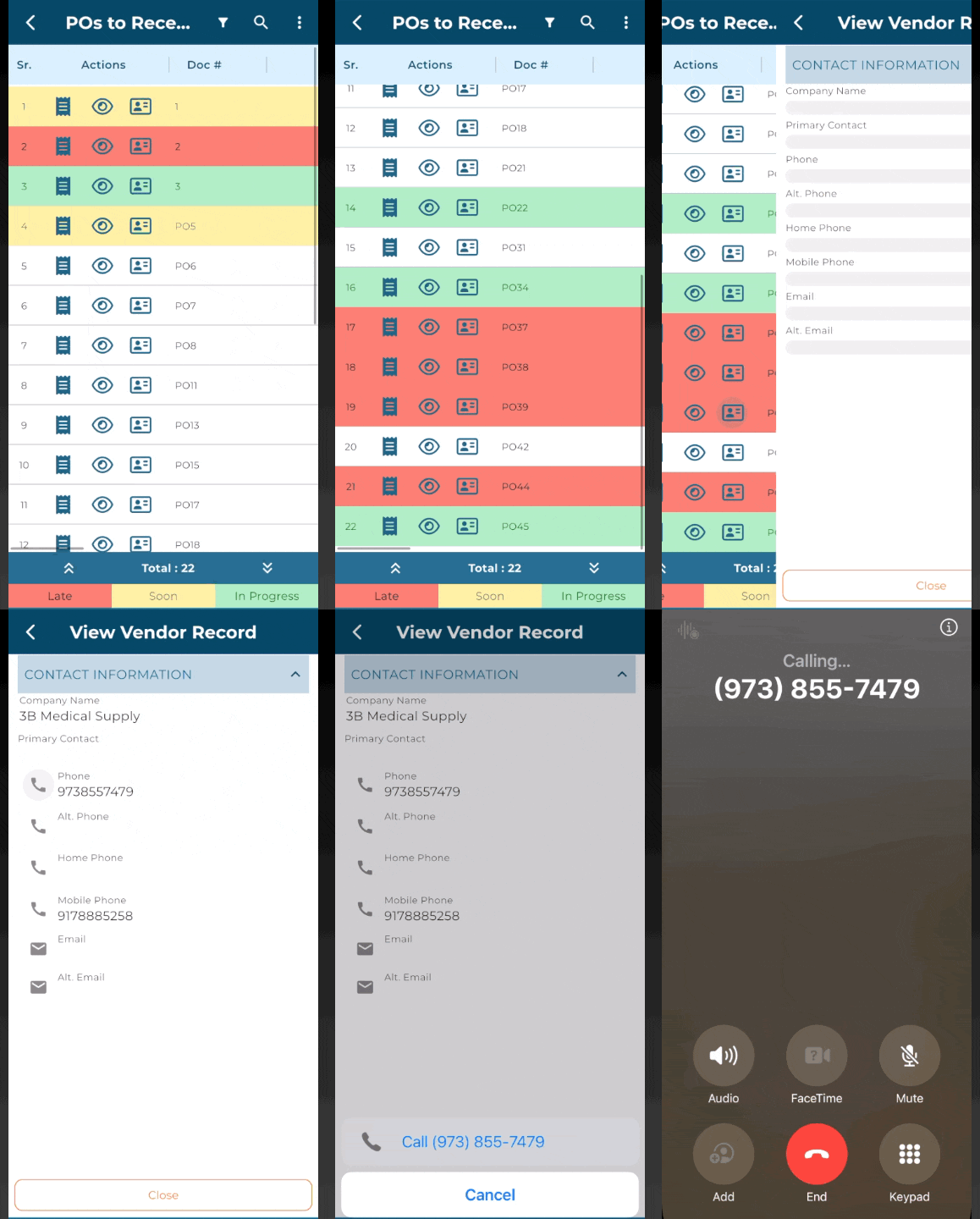
Conditional highlighting turns a long list of POs into a real-time prioritization tool. Each color represents a clear status so your next move is always obvious:
- 🔴 Red/Dark Red: Past expected receipt date — late and needs immediate action.
- 🟡 Yellow/Amber: Expected today or tomorrow — incoming soon, prepare to receive.
- 🟢 Green: Expected within seven days and already partially received — progress in motion, not urgent.
It’s a small visual change with a big operational impact. Instead of sorting through records or checking timestamps, your team instantly knows which orders to focus on and which can wait.
From Highlight to Action: Everything at Your Fingertips
Visibility is only the beginning. The real value comes from what you can do next—all from your mobile device.- Receive items instantly: Complete receipts on the spot—no desktop required.
- View or update POs: Make changes to quantities, item details, or statuses in real time.
- Call or email vendors: Contact suppliers directly for late shipments or delivery confirmations.
- Update vendor or shipping notes: Add updates from your calls or inspections as they happen.
Why It Matters
Every minute you save at the dock adds up. Traditional workflows often mean:
- Switching between tabs or screens
- Logging vendor communications separately
- Returning to your desktop to update purchase orders manually
With mobile access, you bypass all that friction. Return to your PO list, tap refresh, and see your latest updates reflected immediately. Your team stays aligned and accurate throughout the day.
Real-World Example: Turning Dock Disruption Into Efficiency
With a mobile view powered by conditional highlighting, your screen instantly shows:
- PO #PO39
— Late. Needs vendor follow-up and immediate processing.
- PO #PO5
— Expected today. Prep receiving team.
- PO #PO45
— Partial receipts complete. No urgency.
You tap PO #PO39, call the vendor right from your mobile screen, and note on the PO: “Vendor confirmed rescheduled delivery—arriving at 10:30 a.m.” Then update the due date and vendor note. That note automatically updates the PO for your team.
When the shipment arrives, you tap Receive Items, verify quantities, and refresh your list—all without ever opening your laptop.
Streamlining Communication, One Tap at a Time
Vendor communication often gets lost between calls, emails, and handwritten notes. With mobile access, those updates don’t have to wait until you’re back at your desk.
When a shipment is late or a delivery date changes, you can:
- Call or email the vendor directly from your mobile device.
- Update the expected shipping date or memo field immediately.
- Add a vendor message or note right on the PO to capture what was discussed.
Each update becomes part of the PO record in NetSuite — no extra steps, no desktop login, and no delay between the conversation and the record.
The Payoff: Simpler, Smarter Receiving
When your workflow looks like this:
- You know which POs need attention first.
- You can take action immediately from your mobile device.
- You can update records and communicate with vendors in real time.
…you’re no longer reacting to delays—you’re managing proactively. It’s faster, cleaner, and aligned with how modern warehouses operate.
Ready to Rethink Your Receiving Workflow?
Discover how eXtendMobile can streamline your receiving process, prioritize your POs intelligently, and keep your operations moving—without ever going back to your desk.